Fly Go 4 Drone Camera Control
- 4.3
- Rating
- 1.00M
- Installs
- Free
- Price
 Analysis by App-foxy
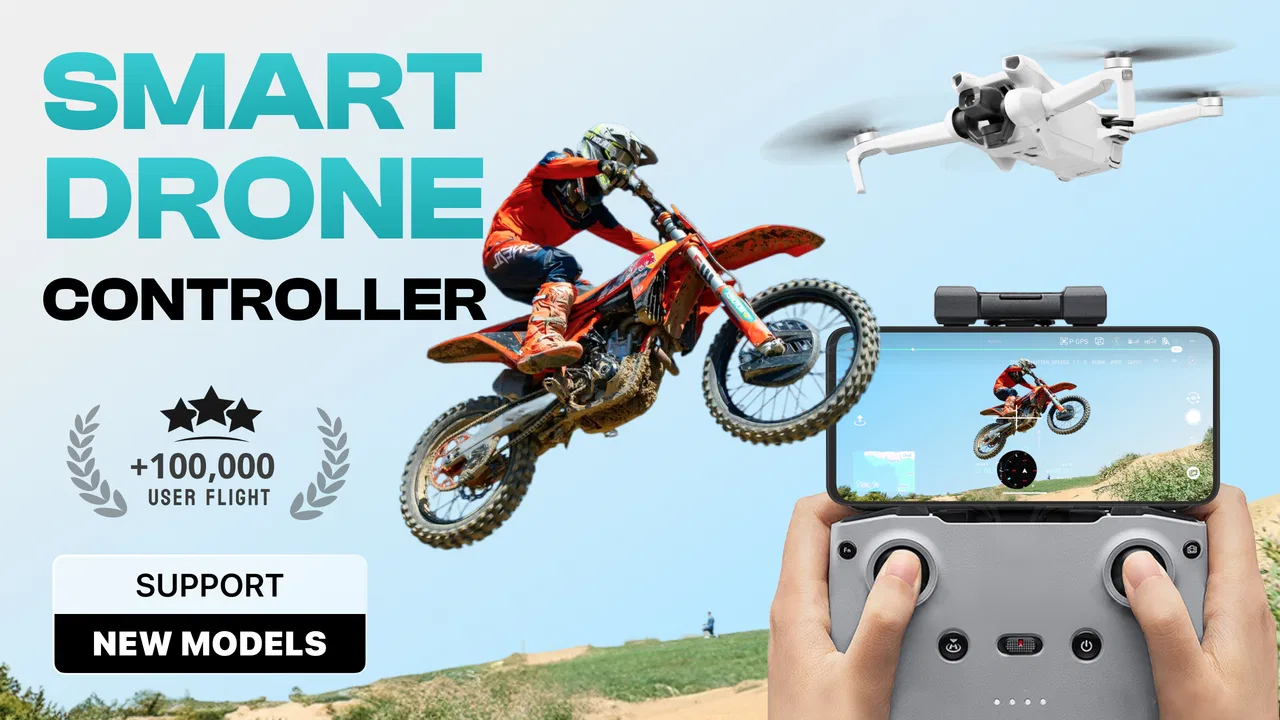
Flying a camera drone is exciting, but the experience can become frustrating when the controller app feels confusing, unreliable, or limited to one particular aircraft. Fly Go 4 Drone Camera Control takes a broader approach. Developed by Apponfire Co. Ltd., it is a free photography app designed to act as a controller for more than forty drone cameras, with a zone map intended to support safer flight planning. I tested it with the mindset of someone who wants a practical companion for casual aerial photography rather than a replacement for professional flight equipment.
My first impression is that this is an app for people who want to get from opening the controller to seeing a live camera view without dealing with a long list of unrelated editing tools. Its purpose is focused: connect with a compatible drone, help operate the aircraft, and provide a map-based view of the surrounding flight area. That focus is useful, although it also means the app’s value depends heavily on whether your particular drone works smoothly with it.
What Fly Go 4 actually offers
Fly Go 4 Drone Camera Control belongs to the photography category, but it is not a conventional photo editor. The camera is attached to the drone, so the app’s job happens before the image reaches your phone: it helps you control the flight and frame the shot while the aircraft is in the air. That makes it more comparable to a drone manufacturer’s companion app than to a mobile camera or editing suite.
You May Also Like

 Blood Strike: 2.5 Anniversary
Blood Strike’s Loadouts Turn Every Drop Into a Tactical Gamble
A close look at Blood Strike’s custom loadouts: how fast access to signature weapons reshapes its battle royale rhythm, rewards preparation, and narrows the gap between fights.

 Pandora - Music & Podcasts
Pandora’s Music Is Easy to Start, but Harder to Recover
Pandora’s strength is its low-effort path from a seed to a station. Its weak spot is how much confidence it asks you to place in connection, setup, and quiet recovery.

 8 Ball Pool
 Is Built on Rivalries, Rematches, and Routine
A close look at the rivalries, rematches, shared routines, and unanswered safety questions that turn a quick pool match into a persistent mobile community.

 Samsung Music
’s Quiet Strength Is Playing What You Already Own
Its reach comes less from spectacle than from dependable access to a personal library. That simplicity is both the app’s strongest retention engine and its ceiling.

 AccuWeather: Weather Radar
AccuWeather Review: A Quick, Clear Forecast for Everyday Decisions
For everyday plans, the best forecast is the one you can understand quickly. AccuWeather makes rain timing, radar, and local conditions easy to act on, with a few trade-offs.

 Hill Climb Racing
Why Hill Climb Racing Still Turns Crashes Into One More Run
A tiny car, a bumpy hill and one more upgrade: Hill Climb Racing keeps resurfacing because its simple chaos makes every near-miss feel personal.
More From Our News Desk
View All News


The developer presents it as a controller for over forty drone cameras. That broad compatibility is one of the most interesting parts of the app because it may be useful to owners who do not want to install a separate controller application for every aircraft. In practice, however, “supports many models” should not be treated as a guarantee that every supported drone will behave identically. Connection quality, available controls, camera response, and the layout of flight functions can vary between devices.
The zone map is another important part of the experience. I see it as a planning aid rather than a substitute for checking local aviation rules. A map can help you think about where you are about to fly, but responsible operation still requires common sense, awareness of people and property, and compliance with the rules that apply in your location. The app can assist with preparation; it cannot make a risky flight safe by itself.
The app is free to install and use as its basic entry point, while its listed in-app purchases range from $6.99 to $69.99 per item. That distinction matters. You can try the controller without paying an upfront purchase price, but some parts of the overall experience may involve optional paid items. Since the listed prices cover a wide range, I would not assume that every useful function is included in the free experience. The sensible approach is to install it, check whether your aircraft connects, and understand what is available before spending money.
At the time of review, the current release is version 1.3.0, and the app requires Android 8.1 or later. It is rated for Everyone, which fits a controller aimed at general users, though the age label does not remove the need for adult supervision when a drone is being operated outdoors. The app was released on November 25, 2024, so users should keep expectations realistic: a relatively young controller can improve over time, but it may also have rough edges that more established manufacturer apps have already polished.
How I would use it before takeoff
I would begin indoors by installing the app, checking the device requirement, charging the drone and controller, and confirming that the phone has enough battery for the flight. I would then open the app before heading outside rather than trying to learn the interface in the middle of a windy park. That simple habit makes a difference because a controller app is not the right place to discover unfamiliar buttons while the aircraft is already airborne.
Once the drone is ready, the most useful workflow is to treat the map and camera view as separate stages. First, use the zone map to think about the launch area and the route. Then switch attention to the live view and controls only after the aircraft is positioned safely. This reduces the temptation to stare at the phone while walking or flying. The map is valuable when used before movement, not as an excuse to ignore the physical surroundings.
A less obvious advantage of this workflow is that it encourages deliberate shot planning. Instead of lifting the drone immediately and searching for a picture, I would choose a subject, decide where the aircraft should hover, and consider how the return path will look. That is especially helpful for beginners, who often spend more time correcting position than composing an image. The app’s usefulness is therefore not only technical; it can make the flight feel more organized.
What the free starting point means
Because the app costs nothing to download, it is easy to test without committing to a purchase. That is a genuine benefit for owners of less common drone models. A manufacturer’s official app may be the obvious first choice, but if it is awkward, unavailable for your phone, or tied to a narrow product range, a multi-drone controller is worth investigating.
Still, free access does not automatically mean complete value. The purchase range means I would pay close attention to what the app asks me to unlock and whether the paid option improves a real part of my own workflow. Someone who only wants to establish a connection and capture occasional holiday footage may have a different threshold from a frequent flyer who wants every available control. The right question is not “Is it free?” but “Does the free layer solve my problem, and is the paid layer worth it for my specific drone?”
I also would not judge the app solely by the highest listed purchase amount. That figure describes the upper end of the available item range, not a universal cost for every user. A careful buyer should inspect each purchase screen, identify what it unlocks, and avoid paying simply because a feature sounds advanced. The app’s free entry point is its strongest financial advantage; the paid value needs to be evaluated individually.
Where it feels more useful than ordinary alternatives
A normal phone camera app cannot control a drone, show the aircraft’s perspective, or help organize a flight around a mapped area. An editing app can improve footage after landing, but it cannot help you avoid a poor flight path or frame a moving subject from above. Fly Go 4 fills that earlier part of the process.
Compared with using several separate controller apps, a multi-drone solution can be more convenient. I can imagine a hobbyist owning different small camera drones and preferring one familiar interface rather than remembering which application belongs to which aircraft. That convenience is particularly attractive when the drones are used occasionally and the owner does not want a collection of rarely opened apps.
The trade-off is that a universal controller may not offer the same depth as an official app made for one drone family. A dedicated manufacturer application may provide more model-specific guidance, clearer firmware handling, specialized camera settings, or better integration with the aircraft. If your drone’s official app is stable and complete, switching to Fly Go 4 may not improve anything. The broader compatibility is most valuable when flexibility matters more than a perfectly tailored experience.
A realistic weekend use case
Imagine taking a compact camera drone to a quiet coastal viewpoint for a short afternoon flight. Before launching, I would open the zone map, look over the intended area, and choose a clear takeoff spot away from pedestrians. I would decide on one wide establishing shot and one slow pass along the shoreline rather than improvising every movement. That plan would preserve battery, reduce unnecessary repositioning, and leave more attention for the surroundings.
During the flight, I would keep the phone at a comfortable angle, use the camera view to frame the subject, and avoid walking backward while watching the screen. If the map indicates a concern, I would treat that as a reason to pause and investigate, not as an automatic authorization to continue. After landing, I would review the footage separately and make notes about what worked. This is where the app fits well: it can be the operational center of a simple shoot, while editing remains a separate task.
For a family outing, the same process helps prevent the common mistake of treating a drone like a toy that can be launched anywhere. The Everyone rating makes the app approachable, but the aircraft itself still needs responsible handling. I would let a child watch the camera feed or help choose a subject, while keeping flight decisions with someone who understands the environment and the controls.
Friction points I would consider first
The biggest practical risk is compatibility in the real world. A controller that claims broad support is appealing, but owners should still verify that their exact drone model and connection method work as expected. Even when two aircraft are described similarly, their available commands may differ. I would test the connection at home, with the propellers removed where appropriate, before relying on the app for an important trip.
Another limitation is the gap between a map and complete flight awareness. A zone map can be helpful, but it does not replace looking up, checking weather, watching for obstacles, or understanding local restrictions. It also cannot compensate for poor visibility or an inexperienced pilot. If you are hoping for an app that makes every flight decision for you, this is not the right expectation.
There is also a learning curve whenever one controller serves several drone types. A specialized app can make its controls feel natural because every button is designed around one product family. A broader app may require you to learn which functions apply to your aircraft and which do not. That is not necessarily a flaw, but it adds a setup step that matters when you want to fly quickly.
Paid items create a second kind of friction. The free installation is reassuring, but the listed purchase range means I would avoid assuming that every control or convenience is available without payment. I would also avoid buying before confirming that the core connection and flight experience are satisfactory. Paying for extras cannot fix a fundamental compatibility problem.
Who is likely to get the most value
I think the app is most suitable for casual drone owners, people experimenting with more than one compatible aircraft, and beginners who want a focused controller rather than a large editing platform. It may also interest users whose official controller app feels inconvenient and who are willing to test an alternative before committing to it.
The free starting point makes it especially reasonable for someone who is unsure whether a multi-drone controller will fit their routine. Install it, check the connection in a safe setting, explore the map, and only then decide whether any paid item solves a problem you genuinely have. That sequence protects you from spending money on a controller that does not suit your aircraft.
I would be more cautious if you fly professionally, depend on advanced model-specific controls, or need a highly predictable workflow for paid assignments. In those situations, the official app may be the better choice because a dedicated tool is more likely to match the aircraft closely. I would also skip this app if your current controller already works reliably and you have no reason to manage multiple drone models.
It is not the best fit for someone looking for a complete photography package. The app’s role is flight control and camera operation, not a replacement for a serious photo editor, file manager, or production workflow. If your priority is color grading, retouching, or organizing a large library, you will still need other tools after the flight.
My final buying decision
Fly Go 4 Drone Camera Control is worth trying because its free entry point and multi-drone focus address a real inconvenience: managing camera flights across different aircraft. Its zone map adds a useful planning layer, and the app makes more sense when used as part of a careful preflight routine rather than as a magic safety system. I also like that its purpose is clear enough for a beginner to understand.
My recommendation comes with a condition: verify your exact drone connection before treating it as your main controller. If the aircraft responds correctly, the camera view is dependable, and the free experience covers your needs, the app can deliver good value without an upfront purchase. If a paid item is tempting, judge it against a specific benefit in your own flights rather than the size of the feature list or the upper end of the purchase range.
The app has a 4.4 average from around 14 thousand ratings, with over 100 thousand installs, which suggests that many people have found it useful enough to try and rate. Those figures are encouraging, but they do not remove the need for a personal compatibility test. My final view is positive for hobbyists who want a flexible controller and sensible for newcomers who are prepared to learn gradually. For demanding pilots with a strong official app already in place, staying with the dedicated alternative is probably the smarter decision.
My practical verdict: start with the free version, test it safely with your own drone, use the map for planning rather than permission, and pay only when an identified feature improves your actual flying routine. That makes Fly Go 4 a reasonable option for flexible personal use, but not an automatic upgrade for every drone owner.
FAQs for Fly Go 4 Drone Camera Control
01What devices are compatible with Fly Go 4 Drone Camera Control?
Fly Go 4 Drone Camera Control is designed to be compatible with most modern Android and iOS devices. However, for optimal performance, it is recommended to use devices running Android 8.0 or later, or iOS 12.0 or later. Ensure your device supports Bluetooth and GPS for seamless operation.
02Does Fly Go 4 offer real-time video streaming?
Yes, Fly Go 4 provides real-time video streaming to your device, allowing you to view live footage from your drone’s camera. The app supports high-definition streaming, but the quality may vary depending on your device's specifications and internet connection stability.
03Is it possible to control multiple drones with Fly Go 4?
Fly Go 4 is primarily designed to control one drone at a time. While you can connect to different drones, switching between them requires disconnecting from the current drone and connecting to another. Future updates may enhance multi-drone management capabilities.
04What safety features does Fly Go 4 include?
Fly Go 4 includes several safety features to ensure secure flying. These include GPS-based flight stabilization, obstacle detection, and return-to-home functions. The app also provides real-time alerts for battery status and no-fly zones to prevent accidents and ensure compliance with local regulations.
05Are there in-app purchases in Fly Go 4?
Fly Go 4 offers a range of in-app purchases to enhance your experience. These include advanced flight modes, additional camera filters, and premium support features. While the basic app is free, these purchases can unlock additional functionalities for more sophisticated drone management.
Pros
- Intuitive interface for easy navigation.
- Seamless connectivity with various drones.
- High-quality video streaming capabilities.
- Advanced flight modes enhance control.
- Real-time telemetry data display.
Cons
- Limited compatibility with older devices.
- Occasional connectivity drop issues.
- In-app purchases can be costly.
- Requires strong internet for updates.
- Battery drain during prolonged use.

Fly Go 4 Drone Camera Control
Gallery